
It's Tuesday evening, and you've just realized your son's soccer practice overlaps with your daughter's piano recital, the grocery run you planned got pushed to tomorrow, and your partner has no idea dinner needs to happen in 45 minutes. Sound familiar? For most families, juggling schedules, meals, and responsibilities feels like a never-ending game of catch-up.
Smart digital calendars are changing that dynamic entirely. Far more than simple scheduling apps, these integrated systems bring your entire household into sync — coordinating activities, managing grocery lists through a digital fridge manager, and responding to voice commands so you can update plans without stopping what you're doing. With one-touch control, even the busiest parent can make real-time adjustments in seconds.
For tech-savvy families ready to move beyond sticky notes and group texts, smart digital calendars offer a genuinely transformative solution. This guide walks you through everything you need — from understanding what these systems can do, to setting them up in a way that actually sticks. Your family's routine is about to get a whole lot smoother.
What Are Smart Digital Calendars and Why Families Need Them
Smart digital calendars are far more than glorified to-do lists. At their core, they're integrated household management platforms that synchronize schedules, automate reminders, connect with smart home devices, and give every family member real-time visibility into what's happening — and when. Think of them as a central nervous system for your home's daily operations.
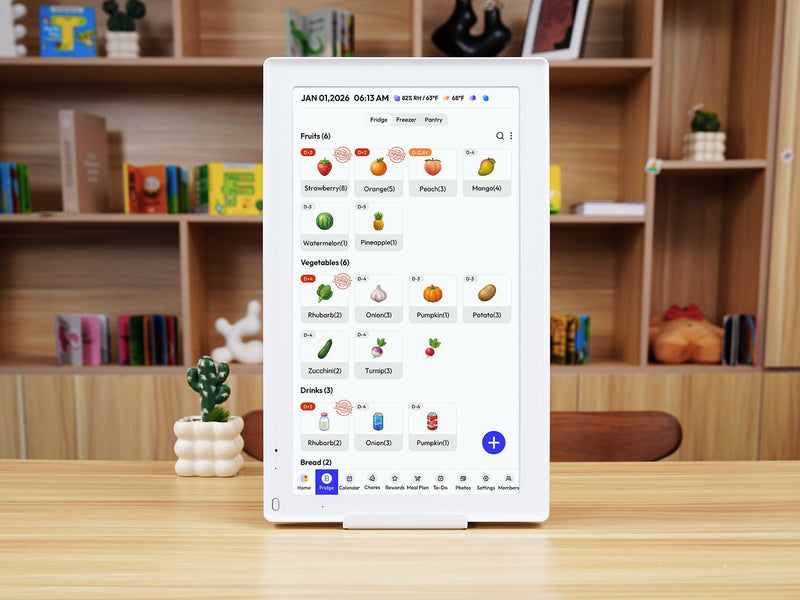
Traditional family organization relied on wall calendars, whiteboards, and a lot of hoping everyone checked the same source. That approach breaks down fast when you're managing school pickups, work deadlines, extracurricular activities, and meal planning simultaneously. A missed update on a paper calendar can cascade into real disruptions — missed appointments, forgotten commitments, or a fridge full of ingredients for a dinner nobody's home to eat.
Modern smart digital calendars solve this by evolving beyond passive scheduling tools into active coordination systems. They sync across every device in your household, send proactive alerts, and integrate with other smart tools to handle tasks like grocery tracking and home automation. For tech-savvy families, this evolution isn't just convenient — it's essential. When your household runs on multiple devices, overlapping schedules, and constant movement, a connected digital system keeps everyone aligned without requiring constant manual updates or check-ins. The result is less friction, fewer surprises, and a family routine that actually holds together.
Key Features for a Seamless Family Experience
The most effective smart digital calendars aren't just about storing dates — they're built around features that actively reduce the mental load of running a household. Four capabilities stand out as genuinely transformative for families: shared calendar access, digital fridge management, one-touch control, and voice command integration. Each solves a specific pain point, and together they create a system that keeps your household running with minimal friction.
The Power of a Shared Family Calendar
A shared family calendar means every schedule change — a rescheduled dentist appointment, a last-minute school event, a work meeting that runs late — is visible to everyone the moment it's updated. No more texting back and forth to confirm who's picking up the kids or whether Thursday is still free. When synced across phones, tablets, and home displays, the calendar becomes a single source of truth that eliminates the "I didn't know about that" problem entirely. Color-coding by family member makes it easy to spot conflicts at a glance, while automated reminders ensure nobody forgets a commitment even on the busiest days. Platforms like Everblog are designed with exactly this kind of household-wide visibility in mind, making it straightforward to keep every family member on the same page.
Integrating Digital Fridge Manager for Smart Grocery Management
A digital fridge manager takes the guesswork out of meal planning by connecting what's in your kitchen to what's on your calendar. When Wednesday shows a packed evening with soccer practice and a school meeting, the system can flag that a quick meal is needed and check whether you have the ingredients on hand. Running low on milk? It gets added to the shopping list automatically. Setting this up typically involves linking your fridge manager app — such as Samsung Food or a compatible smart fridge interface — to your calendar platform, then configuring meal plan triggers based on your weekly schedule. The practical payoff is fewer emergency grocery runs and significantly less food waste.
Streamlining Grocery Management: A Step-by-Step Solution
Grocery management is one of those household tasks that seems simple until it isn't — forgotten staples, duplicate purchases, and last-minute store runs add up to real time and money lost every week. Smart digital calendars, paired with a digital fridge manager, turn this chaotic process into something genuinely manageable. Here's how to make it work for your family.
Start by honestly assessing your current grocery habits. Track one week of shopping: How often do you make unplanned trips? How much food goes to waste? This baseline helps you identify where the biggest inefficiencies are hiding, and gives you a benchmark to measure improvement against once your system is running.
Next, choose a digital fridge manager app that fits your setup. Samsung Food, Grocy, and Out of Milk are popular options that integrate well with major calendar platforms. If you have a smart fridge, check whether its native app supports calendar syncing — many newer models do this natively. Once selected, connect the app to your family calendar so it can read your weekly schedule and flag high-demand days when quick, low-prep meals make more sense than elaborate cooking.
From there, configure meal plan triggers. Set the system to automatically generate a shopping list based on planned meals, and enable low-stock alerts so essentials like eggs, bread, or coffee get added to the list before you actually run out. Use one-touch control — available on most smart displays and fridge interfaces — to add items in real time while you're cooking, without stopping to type or search.
Finally, review your list weekly before shopping rather than building it on the fly at the store. This single habit, supported by your digital system, reduces impulse purchases, cuts food waste noticeably, and saves an average family several hours of grocery-related effort each month.
Organizing Tasks with Voice Commands and One-Touch Control
Hands are rarely free in a busy household. You're stirring pasta, folding laundry, or buckling a car seat when you suddenly remember tomorrow's dentist appointment needs to be moved. That's exactly where voice commands and one-touch control shift from being nice-to-have features to genuine lifesavers — letting you update your family's calendar without stopping what you're doing.
Setting up voice assistant integration starts with choosing your platform. Amazon Alexa, Google Assistant, and Apple Siri all connect with major calendar apps like Google Calendar, Apple Calendar, and Microsoft Outlook. If your household uses multiple devices across different ecosystems, Google Assistant tends to offer the broadest compatibility. Once your calendar app is linked through the assistant's settings, you can start issuing natural commands immediately — "Hey Google, add soccer practice to Thursday at 4 PM" or "Alexa, remind everyone that dinner is at 6:30 tonight."
To get more out of voice control, configure custom routines. Most assistant platforms allow you to create multi-step commands triggered by a single phrase. For example, a "family morning briefing" routine can read out the day's schedule for every family member, announce any meal prep reminders from your fridge manager, and flag upcoming appointments — all triggered by saying "Good morning" to your smart display. This kind of automation compresses what used to be a five-minute coordination conversation into a 30-second hands-free update.
One-touch control complements voice commands for moments when speaking isn't practical. Smart displays like the Google Nest Hub or Amazon Echo Show let you tap a single button to silence an alarm, confirm a grocery item, or mark a task complete. For families, the best practice is placing a shared display in a high-traffic area — the kitchen or entryway — so quick updates happen naturally as part of the daily flow rather than requiring anyone to hunt for a phone.
Implementing Your Smart Digital Calendar System: Practical Guide
Getting a smart digital calendar system off the ground doesn't require a weekend of technical setup — with the right approach, most families are fully operational within a few hours. The key is moving through implementation in a logical sequence rather than trying to configure everything at once.
Begin by researching which platform fits your household's existing devices. Google Calendar works seamlessly across Android and most browsers, Apple Calendar is ideal for iPhone-heavy families, and Microsoft Outlook suits households tied to Windows ecosystems. If your family spans multiple platforms, Google Calendar's cross-compatibility makes it the safest starting point — though dedicated family-focused solutions like Everblog are also worth exploring for households that want deeper household management features built in from the start. Once selected, create a family account and set up individual profiles for each member, assigning distinct colors so schedule visibility is instant.
Next, invite every family member and walk them through accepting access — this step is where many families stall, so do it together during a low-pressure moment like a weekend morning. Follow that by connecting your integrations: link your digital fridge manager app, enable your preferred voice assistant, and pair any smart displays you're using. Test each connection before moving on.
Finally, run a one-week trial where the whole family actively uses the system. Expect minor friction — a reminder that fires at the wrong time, a grocery sync that needs adjustment. These are normal calibration issues, not failures. Address them as they appear, and by week two, the system typically runs with very little intervention. The scalability here is genuine: as your family's needs grow, adding new integrations or members requires only a few taps.
From Household Chaos to Coordinated Family Routine
The Tuesday evening chaos — overlapping schedules, forgotten meals, missed commitments — doesn't have to be your family's default setting. Smart digital calendars bring genuine order to that complexity, not by adding more apps to manage, but by connecting the tools your household already depends on into one coordinated system. From a shared calendar that eliminates scheduling conflicts to a digital fridge manager that keeps grocery runs efficient, every feature is designed to reduce the mental load that quietly exhausts most families.
Voice commands and one-touch control mean updates happen in real time, without interrupting the flow of daily life. And with a straightforward implementation process, getting your family up and running takes hours, not weeks. The payoff compounds quickly: less food waste, fewer missed appointments, and a household that runs on shared information rather than frantic last-minute texts.
If you're a tech-savvy family ready to move beyond patchwork solutions, now is the right moment to start. Pick your platform, set up your shared calendar this weekend, and add one integration at a time. Within a few weeks, you'll wonder how your family managed without it. The smoother routine you've been chasing is closer than you think — start building it today.